
Your secrets stay on your machine.
Latet is a local privacy firewall for AI agents. Before a request leaves your computer, Latet swaps the secrets and personal data it recognizes for realistic fakes, and puts the real values back when the answer returns. A request Latet cannot read in full does not leave at all. Your agent keeps working normally.
Latet in 45 seconds
Try it yourself
Your agent reads .env to set up payments. The key leaves as a fake of the same format, and the other lines leave as they are.
The model writes the configuration with the fake key. Latet puts the real one back before the file is saved.
Set up payments with the key in .env.APP_NAME=shop
PAYMENTS_MODE=live
PAYMENTS_SECRET_KEY=sk_live_51Hq8KzLmN3pQrStUvWxYz0aBcDeFgHiJThe model writes the configuration with the fake key. Latet puts the real one back before the file is saved.
[payments]
mode = "live"
secret_key = "sk_live_51Hq8KzLmN3pQrStUvWxYz0aBcDeFgHiJ"Set up payments with the key in .env.APP_NAME=shop
PAYMENTS_MODE=live
PAYMENTS_SECRET_KEY=sk_live_51Hq8KzLmN3pQrStUvWxYz0aBcDeFgHiJSet up payments with the key in .env.APP_NAME=shop
PAYMENTS_MODE=live
PAYMENTS_SECRET_KEY=sk_live_QURKNhrQQJpyv9IfL4okGZdM2bCvfPnyOSet up payments with the key in .env.[payments]
mode = "live"
secret_key = "sk_live_51Hq8KzLmN3pQrStUvWxYz0aBcDeFgHiJ"Set up payments with the key in .env.[payments]
mode = "live"
secret_key = "sk_live_QURKNhrQQJpyv9IfL4okGZdM2bCvfPnyO"Your agent reads the log to answer you. The email, the card number, the IP address and the token leave as fakes.
The model answers with the fakes it received. Latet puts the real values back before you read the answer.
Why was the payment of j.okafor@fabrikam-logistics.com declined?09:12:44 ERROR payment declined for j.okafor@fabrikam-logistics.com
09:12:44 card 4111 1111 1111 1111, client 81.2.69.160
09:12:45 retry, Authorization: Bearer eyJhbGciOiJIUzI1NiJ9.eyJzdWIiOiJ1XzdmM2EifQ.c2lnbmF0dXJlLW5vdC1yZWFs The model answers with the fakes it received. Latet puts the real values back before you read the answer.
The payment by j.okafor@fabrikam-logistics.com was declined. It used card 4111 1111 1111 1111 and came from 81.2.69.160.Why was the payment of j.okafor@fabrikam-logistics.com declined?09:12:44 ERROR payment declined for j.okafor@fabrikam-logistics.com
09:12:44 card 4111 1111 1111 1111, client 81.2.69.160
09:12:45 retry, Authorization: Bearer eyJhbGciOiJIUzI1NiJ9.eyJzdWIiOiJ1XzdmM2EifQ.c2lnbmF0dXJlLW5vdC1yZWFs Why was the payment of laura.mitchell@contoso-89e8.example declined?09:12:44 ERROR payment declined for laura.mitchell@contoso-89e8.example
09:12:44 card 4345 0900 0435 1539, client 203.0.113.135
09:12:45 retry, Authorization: Bearer eyJGcVSXfq0okHmDpI2d.eyJ5t5BnmCEhGB1X56i5Uo.DPFK2AiRJjxH59TFtjE3Syw3 Why was the payment of j.okafor@fabrikam-logistics.com declined?The payment by j.okafor@fabrikam-logistics.com was declined. It used card 4111 1111 1111 1111 and came from 81.2.69.160.Why was the payment of laura.mitchell@contoso-89e8.example declined?The payment by laura.mitchell@contoso-89e8.example was declined. It used card 4345 0900 0435 1539 and came from 203.0.113.135.Your agent reads the two orders from the database.
The model writes the change with the values it received. Latet puts the real ones back, and the query runs with them on your machine.
Here Latet masks only the emails, which it recognizes by their shape. The rest leaves as it is, names included.
The max profile turns on strict data mode, and so does data: strict. Latet masks every value and keeps only the names of columns and keys. The same value always gets the same fake, so counts and joins still work.
In the dashboard, the Choose the columns to keep in clear button proposes id, status and created_at for this output. With one click, these columns reach the model as they are. The rest stays masked.
Set the status of the order of j.okafor@fabrikam-logistics.com to shipped.id,status,created_at,customer,email,amount
1042,shipped,2026-10-03,Emily Carter,emily.carter@northwind-legal.com,129.90
1043,refunded,2026-10-04,Jon Okafor,j.okafor@fabrikam-logistics.com,48.50 The model writes the change with the values it received. Latet puts the real ones back, and the query runs with them on your machine.
UPDATE orders SET status = 'shipped'
WHERE email = 'j.okafor@fabrikam-logistics.com';Set the status of the order of j.okafor@fabrikam-logistics.com to shipped.id,status,created_at,customer,email,amount
1042,shipped,2026-10-03,Emily Carter,emily.carter@northwind-legal.com,129.90
1043,refunded,2026-10-04,Jon Okafor,j.okafor@fabrikam-logistics.com,48.50 Set the status of the order of laura.mitchell@contoso-89e8.example to shipped.id,status,created_at,customer,email,amount
1042,shipped,2026-10-03,Emily Carter,james.williams@tailspin-1c89.example,129.90
1043,refunded,2026-10-04,Jon Okafor,laura.mitchell@contoso-89e8.example,48.50 Set the status of the order of j.okafor@fabrikam-logistics.com to shipped.UPDATE orders SET status = 'shipped'
WHERE email = 'j.okafor@fabrikam-logistics.com';Set the status of the order of laura.mitchell@contoso-89e8.example to shipped.UPDATE orders SET status = 'shipped'
WHERE email = 'laura.mitchell@contoso-89e8.example';Set the status of the order of j.okafor@fabrikam-logistics.com to shipped.id,status,created_at,customer,email,amount
1042,shipped,2026-10-03,Emily Carter,emily.carter@northwind-legal.com,129.90
1043,refunded,2026-10-04,Jon Okafor,j.okafor@fabrikam-logistics.com,48.50 Set the status of the order of laura.mitchell@contoso-89e8.example to shipped.id,status,created_at,customer,email,amount
3595,fewmppu,2025-12-22,Ytrac Rpqrbj,james.williams@tailspin-1c89.example,406.20
9786,kcfppzrb,2025-10-02,Emd Aqcgea,laura.mitchell@contoso-89e8.example,93.47 Set the status of the order of j.okafor@fabrikam-logistics.com to shipped.UPDATE orders SET status = 'shipped'
WHERE email = 'j.okafor@fabrikam-logistics.com';Set the status of the order of laura.mitchell@contoso-89e8.example to shipped.UPDATE orders SET status = 'shipped'
WHERE email = 'laura.mitchell@contoso-89e8.example';Set the status of the order of j.okafor@fabrikam-logistics.com to shipped.id,status,created_at,customer,email,amount
1042,shipped,2026-10-03,Emily Carter,emily.carter@northwind-legal.com,129.90
1043,refunded,2026-10-04,Jon Okafor,j.okafor@fabrikam-logistics.com,48.50 Set the status of the order of laura.mitchell@contoso-89e8.example to shipped.id,status,created_at,customer,email,amount
1042,shipped,2026-10-03,Ytrac Rpqrbj,james.williams@tailspin-1c89.example,406.20
1043,refunded,2026-10-04,Emd Aqcgea,laura.mitchell@contoso-89e8.example,93.47 Set the status of the order of j.okafor@fabrikam-logistics.com to shipped.UPDATE orders SET status = 'shipped'
WHERE email = 'j.okafor@fabrikam-logistics.com';Set the status of the order of laura.mitchell@contoso-89e8.example to shipped.UPDATE orders SET status = 'shipped'
WHERE email = 'laura.mitchell@contoso-89e8.example';Your agent reads the order from the shop's API.
The model answers with the values it received. Latet puts the real ones back before you read the answer.
Here Latet masks only the emails, which it recognizes by their shape. The rest leaves as it is, names included.
The max profile turns on strict data mode, and so does data: strict. Latet masks every value and keeps only the names of columns and keys. The same value always gets the same fake, so counts and joins still work.
In the dashboard, the Choose the columns to keep in clear button proposes id, status and created_at for this output. With one click, these columns reach the model as they are. The rest stays masked.
What is the status of order 1042, and the customer's email? {
"id": 1042,
"status": "shipped",
"created_at": "2026-10-03",
"customer": "Emily Carter",
"email": "emily.carter@northwind-legal.com",
"total": 129.90,
"note": "Leave the parcel at reception"
} The model answers with the values it received. Latet puts the real ones back before you read the answer.
Order 1042 has status shipped. The customer's email is emily.carter@northwind-legal.com.What is the status of order 1042, and the customer's email? {
"id": 1042,
"status": "shipped",
"created_at": "2026-10-03",
"customer": "Emily Carter",
"email": "emily.carter@northwind-legal.com",
"total": 129.90,
"note": "Leave the parcel at reception"
} What is the status of order 1042, and the customer's email? {
"id": 1042,
"status": "shipped",
"created_at": "2026-10-03",
"customer": "Emily Carter",
"email": "james.williams@tailspin-1c89.example",
"total": 129.90,
"note": "Leave the parcel at reception"
} What is the status of order 1042, and the customer's email? Order 1042 has status shipped. The customer's email is emily.carter@northwind-legal.com.What is the status of order 1042, and the customer's email? Order 1042 has status shipped. The customer's email is james.williams@tailspin-1c89.example.What is the status of order 1042, and the customer's email? {
"id": 1042,
"status": "shipped",
"created_at": "2026-10-03",
"customer": "Emily Carter",
"email": "emily.carter@northwind-legal.com",
"total": 129.90,
"note": "Leave the parcel at reception"
} What is the status of order 1042, and the customer's email? {
"id": 3595,
"status": "fewmppu",
"created_at": "2025-12-22",
"customer": "Ytrac Rpqrbj",
"email": "james.williams@tailspin-1c89.example",
"total": 406.20,
"note": "Bcagq llh ayeftu zc gtyzfybdm"
} What is the status of order 1042, and the customer's email? Order 1042 has status shipped. The customer's email is emily.carter@northwind-legal.com.What is the status of order 1042, and the customer's email? Order 1042 has status fewmppu. The customer's email is james.williams@tailspin-1c89.example.What is the status of order 1042, and the customer's email? {
"id": 1042,
"status": "shipped",
"created_at": "2026-10-03",
"customer": "Emily Carter",
"email": "emily.carter@northwind-legal.com",
"total": 129.90,
"note": "Leave the parcel at reception"
} What is the status of order 1042, and the customer's email? {
"id": 1042,
"status": "shipped",
"created_at": "2026-10-03",
"customer": "Ytrac Rpqrbj",
"email": "james.williams@tailspin-1c89.example",
"total": 406.20,
"note": "Bcagq llh ayeftu zc gtyzfybdm"
} What is the status of order 1042, and the customer's email? Order 1042 has status shipped. The customer's email is emily.carter@northwind-legal.com.What is the status of order 1042, and the customer's email? Order 1042 has status shipped. The customer's email is james.williams@tailspin-1c89.example.Your agent reads a screenshot. With the optional text recognition, Latet reads its text on your machine and covers each value with its fake.
The model answers with the fakes it read in the image. Latet puts the real values back before you read the answer.
Refund this customer: the details are in the screenshot.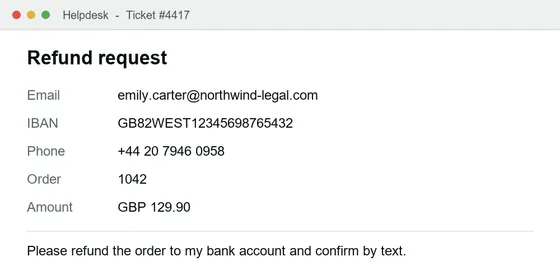
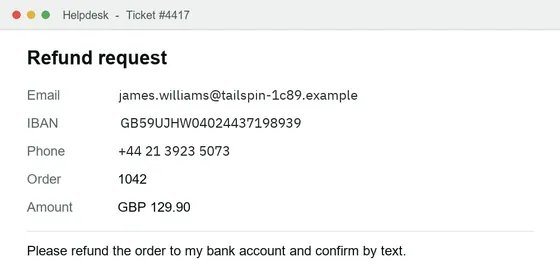
The model answers with the fakes it read in the image. Latet puts the real values back before you read the answer.
Refund ready for emily.carter@northwind-legal.com, to IBAN GB82WEST12345698765432. The confirmation goes by text to +44 20 7946 0958. Refund this customer: the details are in the screenshot.Refund this customer: the details are in the screenshot.Refund this customer: the details are in the screenshot.Refund ready for emily.carter@northwind-legal.com, to IBAN GB82WEST12345698765432. The confirmation goes by text to +44 20 7946 0958. Refund this customer: the details are in the screenshot.Refund ready for james.williams@tailspin-1c89.example, to IBAN GB59UJHW04024437198939. The confirmation goes by text to +44 21 3923 5073. Each fake here was made by Latet itself. Point at a value, or tap it, to see its counterpart.
How it works
One request, from your agent to the model and back.
-
It finds what is sensitive
Before anything leaves, Latet reads the request. It finds secrets such as API keys, tokens, passwords and private keys. It finds personal data such as email addresses, phone numbers, IBANs, card numbers, and ID and tax numbers from 15 countries. It also finds the terms you add yourself and this computer's identity.
On your machineYouRefund emily.carter@northwind-legal.com to IBAN GB82WEST12345698765432 and confirm by text to +44 20 7946 0958.What the model receives…
-
It swaps in realistic fakes
Each value becomes a fake of the same shape, and the same value always gets the same fake. Code and configuration still make sense to the model.
On your machineYouRefund emily.carter@northwind-legal.com to IBAN GB82WEST12345698765432 and confirm by text to +44 20 7946 0958.What the model receivesYouRefund james.williams@tailspin-1c89.example to IBAN GB59UJHW04024437198939 and confirm by text to +44 21 3923 5073. -
It puts the real values back
The answer comes back with the fakes. On your machine, Latet puts the originals back in answers, streamed text and tool calls, so the files your agent writes contain the real values.
On your machineYouRefund emily.carter@northwind-legal.com to IBAN GB82WEST12345698765432 and confirm by text to +44 20 7946 0958.ModelRefund ready for emily.carter@northwind-legal.com,to IBAN GB82WEST12345698765432. The confirmation goes by text to +44 20 7946 0958. What the model answersYouRefund james.williams@tailspin-1c89.example to IBAN GB59UJHW04024437198939 and confirm by text to +44 21 3923 5073.ModelRefund ready for james.williams@tailspin-1c89.example,to IBAN GB59UJHW04024437198939. The confirmation goes by text to +44 21 3923 5073.
Everything runs on your machine: there is no Latet cloud service, no telemetry and no analytics.
For a team or a company, one Latet on your own server masks the requests of every computer and program, over HTTPS. Each person and each program gets a space of its own. Nothing goes to a Latet cloud there either. Latet on a server
What it protects
Agents read on your behalf, and autonomous agents do it on their own for hours. Latet checks every request before it leaves, wherever its text came from.
-
Your prompts
Latet checks what you type. Each value becomes a fake of the same shape, and names do too if you use the optional local name model.
See it in the demo -
Files the agent reads
Latet masks keys, passwords and personal data in .env files, configuration and customer exports. Files the agent writes get the real values back.
See it in the demo -
Command output and logs
Latet masks tokens, email addresses, public IP addresses and ID numbers in logs, stack traces and command output.
See it in the demo -
Database queries
Secret columns are always masked. In strict data mode, every value is masked, and the fakes keep joins and counts working.
See it in the demo -
Screenshots and images
With the optional text recognition, Latet reads the text of every image a request carries, on your machine, and covers each value with its fake. An image it cannot read is withheld.
See it in the demo
Latet also covers web pages, instructions such as CLAUDE.md, and what no pattern finds.
Everything Latet protectsEvery request, in a dashboard
A local dashboard shows every request your agents sent. It puts the original on your machine next to what the model received, and labels each masked value with its type and the rule that found it.

Works with the agents you use
Latet sits between your agent and its provider, and works with the agent's own sign-in or with your API keys. The requests still reach the same provider, after Latet has checked or masked them.
Coding agents
- Claude Code: CLI, VS Code and JetBrains, with a Pro or Max subscription or an API key
- Codex: CLI and Desktop, with ChatGPT or an API key
- OpenCode, with API-key providers
- Gemini CLI, with a Gemini API key or Vertex AI
- GitHub Copilot, JetBrains Junie and AI Assistant, Zed, Cline, Kilo Code, Continue, Qwen Code, Crush and other tools, with your API key
Autonomous agents
Hermes Agent, OpenClaw, Goose, OpenHands, and any agent that takes an OpenAI-compatible base URL
At work
Claude Code and Codex through your company's LLM gateway, Amazon Bedrock, Google Vertex, Microsoft Foundry or Azure OpenAI
Scripts and SDKs
The OpenAI, Anthropic and Google SDKs, LangChain, LangGraph, AutoGen, CrewAI, Aider, etc.
Latet does not cover Claude Desktop's Chat and Cowork signed in to Claude, cloud sessions, or Cursor, Windsurf and the other tools whose requests are sent from the vendor's servers, not from your machine.
Set up your agentInstall it in one command
You do not need administrator rights, because everything installs into your user account. The installer adds uv, the Python tool manager, if you do not have it yet, and then installs Latet. It changes nothing else: it leaves your agents' settings alone and adds nothing that starts at login.
curl -LsSf https://raw.githubusercontent.com/Latet-AI/latet/main/scripts/install.sh | shirm https://raw.githubusercontent.com/Latet-AI/latet/main/scripts/install.ps1 | iexThen
- See Latet at work in about 30 minutes, with a pretend agent, a pretend model and invented data in your browser. Nothing leaves your computer. About the tutorial
- Run one session of your agent through Latet, without changing any settings.
- Route your agents through Latet for good, once it fits your work.
Editions
Latet comes in two editions. The Community Edition protects people and teams, and is free for every company. The Enterprise Edition, coming soon, adds what a company's security team needs: rules set for everyone that nobody can lower, decisions taken centrally, and numbers for its audits.
Latet Community Edition
It includes everything that protects people and teams, free for every company, whatever its size, for its own work.
On your computer
For one person, it has everything above: masking, the dashboard, the local reviewer and the Live Reviewer, your own terms and rules, and the tutorial.
On a server, for a team
One Latet serves every computer in a team or a company, and the programs that reach a model on their own. The server masks the requests it receives over HTTPS, and never relies on a computer to do it.
- A space for each. People connect their computers with a one-time code, and programs use an API key that an administrator creates. Each has its own encrypted settings, vault and history.
- Each person's rules. Everyone keeps their own rules, and rules are shared by hand: by export and import, or in a project's
latet.yaml. - An administration log. It records who did what and when, but never a value.
- Grows with you. You can run as many stateless instances as you need behind a load balancer, with PostgreSQL and Valkey.
Latet Enterprise Edition
Coming soonIt is for a company whose security team sets the rules for everyone. On top of the Community Edition, it adds:
- Shared rules. Administrators set terms, lists, recognizers, field rules and protection levels for everyone, in one place; each person adds their own on top.
- Locked rules. The security team sets a floor nobody can go below, on the server or in a managed policy file.
- Central approvals. A change that lowers protection is decided by the security team.
- Audit reports. They give counts by group, project, agent and category, in CSV and JSON, but never a value.
- SIEM. Events go to Splunk, Elastic, Microsoft Sentinel or syslog.
- Synced terms. Latet takes the names of customers and colleagues from a file, a URL, Entra ID or LDAP.
- Sign-in. People sign in through OIDC with Entra ID, Google, Okta and others, and accounts come through SCIM 2.0.
- Roles. There are five: user, group lead, security, read-only auditor and admin.
Hear when Latet Enterprise is available
Leave your email address. You will get one message when Latet Enterprise is available, and nothing else.
Licensing
Latet is source-available: the code is public, and you can read, check and change it. The Community Edition is free for everyone, companies of any size included. The Enterprise Edition adds what a company needs to manage Latet centrally, under a commercial license.
Free, for everyone
- At work, in any company. Use Latet for your company's own work, on any number of computers and servers, for any number of people, whatever the company's size or revenue. A company that runs it for its 5,000 employees and its build servers pays nothing.
- For yourself. Personal projects, study, research and trying it out are free.
- Non-commercial use. Any non-commercial use is free, by nonprofits, schools and universities too.
- Changing it. You may change Latet for those same uses, and share it or your changes free of charge for non-commercial purposes. Keep the
LICENSEfile and the copyright notices, and say that you changed it.
Commercial license
Before you sell or offer it. Write before you sell Latet or a changed copy of it, offer it to others as a service (running it for other companies or for your customers, hosted or managed), build it into a product or service you sell, or make a commercial fork.
For example. An agency that runs Latet in front of the AI tools it sells to its clients needs a commercial license, and so does a security vendor that ships Latet inside its own product. A consultant who installs Latet for a company, which then uses it for its own work, does not: the company uses it for free, and the consultant may charge for the work.
The Enterprise Edition. Using its features in production needs a Latet Enterprise license; developing and testing with them is free. Write with your company's name and how many people will use Latet.
Write to info@latet.aiThe Community Edition has no license keys and never contacts anyone to check anything. The Enterprise features check a signed license file, offline.
The full termsTry it on your machine
Install Latet in a few minutes, then take the 30-minute tutorial with a pretend agent, a pretend model and invented data, before you point a real agent at it.